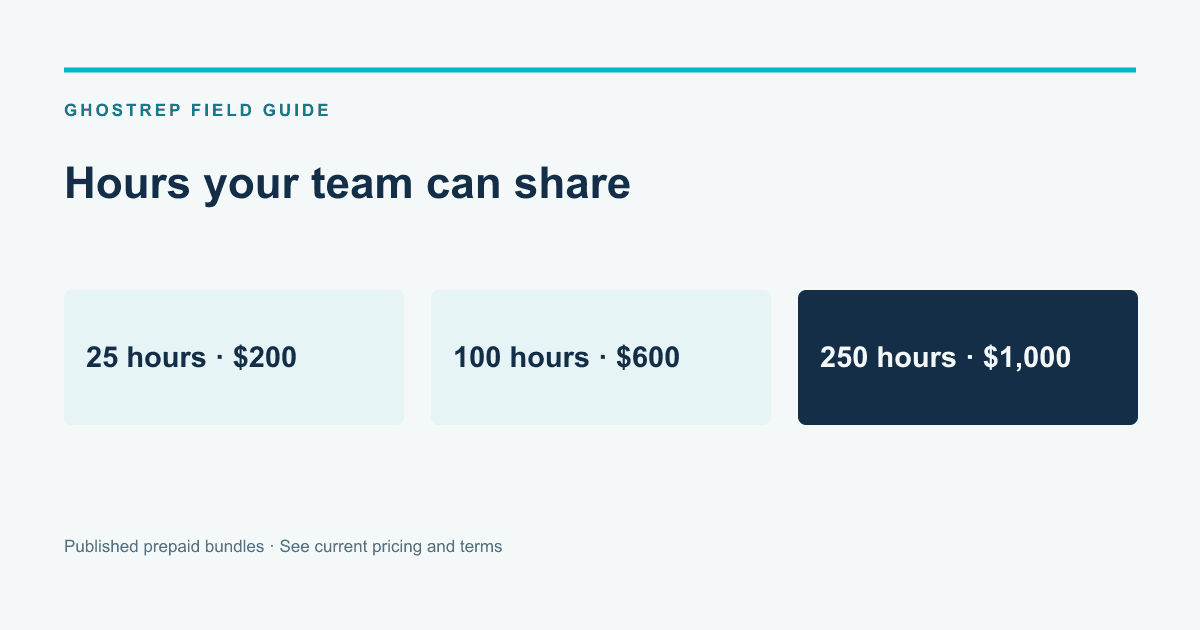
GhostRep publishes its prepaid prices so a sales manager can estimate an initial rollout before a sales conversation. The offer is straightforward: buy hours, share them across the team and add capacity when needed.
That makes the price visible. It does not make every competing pricing model wrong. A subscription, a services engagement and a prepaid software bundle can cover different work. The useful comparison is what your team needs, what is included and what the total commitment will be.
Next Step
Compare pricing against expected usage and revenue lift
Transparent pricing is useful only when buyers can model how many hours reps need and what better execution is worth.
The current GhostRep bundles
| Bundle | One-time price | Effective hourly rate |
|---|---|---|
| 25 hours | $200 | $8 |
| 100 hours | $600 | $6 |
| 250 hours | $1,000 | $4 |
Hours are shared across the organization and do not expire under the current published terms. The bundles are one-time purchases without automatic renewal. The larger bundle changes the amount of capacity and effective rate; it should be chosen because the work fits, not simply because its hourly rate is lower.
The pricing page and terms are the current references for purchasing and usage. If your decision depends on a particular workflow, device or integration, confirm that fit before buying.
Estimate use from the work you plan to do
Choose the first group and the first coaching priority. Estimate the recording, coaching and practice usage relevant to that workflow. Keep manager preparation and review time in the rollout plan even though those hours are not the same thing as purchased platform capacity.
For an illustrative arithmetic example, a 25-hour balance contains 1,500 minutes. If a workflow consumed exactly 15 minutes per session, that balance would cover 100 such sessions. Actual usage depends on the paid features and sessions your team uses; the example does not define every feature’s billing behavior.
Start with a realistic schedule. A large balance is not an adoption plan. Decide when reps will use the workflow, who reviews the output and what the next attempt should improve.
Compare pricing models on the same basis
A per-user subscription may include capabilities or commitments that a prepaid product does not. A consulting engagement may include diagnosis, process development, implementation and ongoing human coaching. A usage-based product may require a closer estimate of the activity your team expects.
Put the written offers side by side. Identify the cost of the work you actually need rather than comparing a headline subscription number with a service package. Do not assume a competitor’s quote from another company applies to your team.
| Question | Why it changes the comparison |
|---|---|
| Who can use the product? | Seats, roles and organization access may be priced differently. |
| What usage is included? | Recording, processing, storage and other activity may have different limits. |
| What setup is required? | Implementation and internal staff time affect the total cost. |
| What is the commitment? | Term, renewal and cancellation rules affect flexibility. |
| What support is included? | Human coaching, technical support and onboarding are different services. |
Next Step
Test the system before committing to another subscription
GhostRep is built around prepaid hours, so teams can start with the workflows that expose whether reps are actually improving.
Ask about the workflow behind the price
If your goal is live support in homeowner appointments, ask to see that workflow on a supported device. If it is manager review, check how a recording, transcript and coaching recommendation are accessed. If it is practice, try a scenario using current company material.
Confirm the path your team will use. An available feature still needs the right configuration and a practical place in the manager’s week. The roofing workflow explains how GhostRep connects capture, live coaching, review and practice.
Include internal time without inventing savings
The software invoice is one part of the investment. Training material preparation, setup, rep time and manager review also matter. Record which activities change and which continue regardless of the platform.
A manager who spends less time preparing a review may have more time for a rep who needs help. That is a capacity benefit. It becomes a cash saving only when the expense changes. Do not subtract an entire manager salary from the cost of software while expecting the manager’s work to continue.
Use the training-cost comparison to build a consistent model. Keep actual costs, time estimates and projected benefits in separate rows.
Choose a useful evaluation period
Before rollout, define the conversation or skill you want to improve. Collect a baseline from comparable work. During use, record participation, review time and the quality of the next attempt. If you evaluate business outcomes, keep lead source, territory, season and job completion in view.
At the end of the period, decide whether the workflow is useful enough to continue. A prepaid model makes the purchase visible, but it does not remove the need to evaluate adoption and results. Extend the program when the evidence supports the next step.
Next Step
Compare software with training and education providers
Course libraries, coaching programs, and practice software solve different parts of rep development. Keep those categories separate before comparing price or fit.
Questions buyers commonly ask
Do I need to buy the largest bundle?
No. Choose the amount that fits the initial group and expected use. The effective hourly rate is one factor; having a workable coaching routine matters too.
Is there a monthly subscription for these bundles?
The published bundles are one-time prepaid purchases. Check the current pricing page and terms for the offer you are purchasing.
Does published pricing mean no sales conversation is needed?
You can see the bundle cost without a quote. A conversation is still useful when your decision depends on a specific setup, supported device or connection to another system.
How should I evaluate another provider’s quote?
Use its current written scope. Compare included work, usage, access, support and commitment with the same requirements you use for GhostRep. A fair comparison makes the differences explicit.
What is the next step?
Choose a starting bundle when the workflow fits, or contact sales with the particular appointment or manager-review problem you want to solve.
Compare tools and find fit
Use the comparison, then go deeper
If this article helped narrow the category, use the hub to explore specific workflows and the product pages to understand where GhostRep fits.
All free tools
Browse 131 free tools by workflow instead of trying to infer fit from product-level feature lists.
Browse all tools →Products overview
See how the GhostRep platform connects onboarding, role-play, field support, and coaching.
See all products →ROI calculator
Model the revenue impact of training and coaching improvements before you change platforms.
Use ROI calculator →About the Author
Tim Nussbeck
Founder & CEO of GhostRep
20+ years in roofing and home improvement sales—knocking doors, running teams, and building practical coaching systems. Built GhostRep to give every rep access to the coaching top teams get.
Comparison next step
Use the comparison, then run the math
If this article narrowed the category, model the impact before you switch platforms. Book a walkthrough when you want GhostRep mapped to your current stack and workflow.
- ✓Best fit if you are comparing tools but still missing a buying standard.
- ✓Useful for estimating payoff before a platform switch.
- ✓Demo shows how onboarding, training, and field coaching connect in one system.
Start Here
Model the ROI first
Estimate the upside of better close rates, faster ramp, and stronger rep performance.
Model the ROI firstNeed it mapped to your team?
Talk through your current workflow, traffic mix, and where GhostRep fits before you change anything.
Book a 15-minute walkthroughYou Might Also Like
Siro does not publish a self-serve price. Compare Siro and GhostRep on roleplay, field recording, live coaching, integrations, security, and buying risk.
Read article →Build a home improvement sales software stack across CRM, canvassing, estimating, proposals, financing, handoff, coaching, and reporting.
Read article →Compare Siro vs Rilla on recording, coaching workflow, integrations, pricing visibility, adoption questions, and a neutral 30-day pilot scorecard.
Read article →