Fictional planning example: picture the week after a hail event: 642 names in the CRM, 117 with no owner, three versions of “inspection scheduled,” duplicate spouses in different stages, and follow-up tasks created by an automation nobody trusts. Another seven-message cadence will not rescue that queue. It will amplify the bad records.
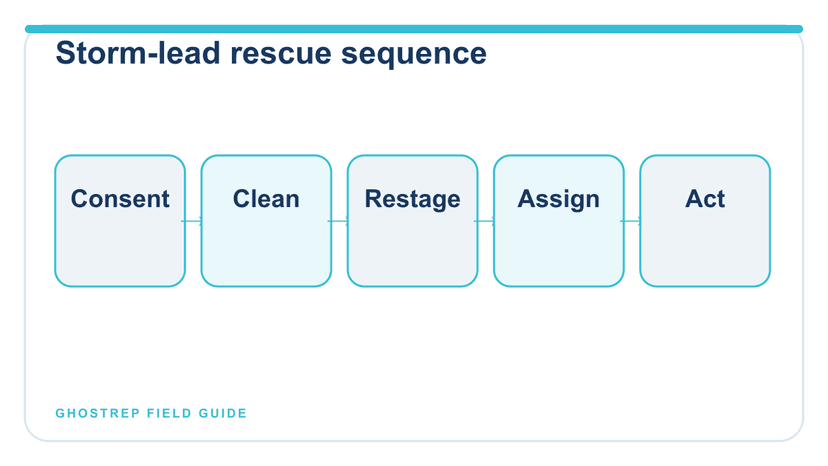
A storm-lead graveyard is a data cleanup and ownership job before it is a persuasion job. Preserve permission, remove duplicates, rebuild the stage from actual activity, assign one owner, and write one useful next action. This page starts after the lead exists; the roofing lead-channel guide owns acquisition.
Define the graveyard before touching it
Do not let “old lead” become the only filter. Build a rescue view from verifiable activity:
- no owner;
- no next action or overdue next action;
- stage unsupported by the activity record;
- appointment scheduled without confirmation;
- inspection completed without a documented customer update;
- duplicate or conflicting record;
- missing source or contact-permission evidence;
- paused record without a customer-selected future date; or
- opt-out, wrong party, invalid data, or closed project still receiving messages.
The last group is not a re-engagement queue. It is a suppression and correction queue.
Create a minimum trusted storm-lead record
What must be known before outreach resumes
Source and acquired date
- Acceptable evidence: Form, referral, event, inbound call, or vendor record tied to a date
- If missing: Quarantine; do not invent attribution
Contact permission
- Acceptable evidence: Channel-specific record appropriate to the workflow and applicable rules
- If missing: Route for compliance review before outreach
Customer-stated need
- Acceptable evidence: Exact inquiry or neutral summary
- If missing: Use “need unknown”; never manufacture storm damage
Current stage
- Acceptable evidence: Last verified customer or work event
- If missing: Restage from evidence
Owner
- Acceptable evidence: One named role or person
- If missing: Assign before queue entry
Next action
- Acceptable evidence: Action, owner, due date, channel, and purpose
- If missing: Record is not work-ready
Stop state
- Acceptable evidence: Opt-out, wrong party, duplicate, invalid, completed, or disqualified reason
- If missing: Suppress and correct before any sequence runs
Do not buy, enrich, call, text, or email a list merely because a vendor labels it “storm leads.” Verify provenance and permitted use for the actual channel. The FTC’s Telemarketing Sales Rule guidance and the FCC’s consent-revocation order and guidance illustrate why source, permission, opt-out, and suppression controls belong in the operating record. Federal and state requirements vary by workflow; qualified counsel should review the program.
Restage every lead from customer reality
“Follow-up” is not a stage. It describes an activity. Stages should answer what has happened and what decision is pending.
- New permitted inquiry: awaiting the first allowed response.
- Connected: customer need clarified; next option not selected.
- Appointment proposed: specific options sent; none accepted.
- Appointment scheduled: customer acceptance, date, time, location, required access permission and owner recorded.
- Inspection completed: observations exist; customer update pending or complete.
- Scope or estimate review: controlling document delivered; questions or decision pending.
- Customer-selected pause: reason and future date recorded.
- Project moving forward: next operational handoff documented.
- Closed: completed, declined, duplicate, invalid, no-contact, or another specific outcome.
The sales pipeline template can turn those stages into explicit entry evidence, exit evidence, owners, and aging rules.
Five fictional records on the rescue board
The records, dates and counts below are illustrative. They are not customer results or instructions to contact a real person. Confirm the channel, current availability and company authorization before carrying out a proposed action.
Five records from the rescue queue
A: web inquiry, Jul. 18:
Evidence problem: Appointment proposed; no reply; email permission recorded
Correct disposition: Appointment proposed
Next action: Owner sends two available times by email todayB: purchased list:
Evidence problem: Vendor label only; permission evidence absent
Correct disposition: Compliance quarantine
Next action: Verify provenance and permitted use; no outreachC: inspection completed:
Evidence problem: Rep promised summary Friday; no update recorded
Correct disposition: Inspection completed, promised update overdue
Next action: Manager reviews summary and contacts customer by 3 p.m.D: duplicate records:
Evidence problem: One record says scheduled; one says no contact
Correct disposition: Hold outreach; authorized duplicate review
Next action: Preserve both activity histories and the no-contact instruction; resolve identity and consent before an authorized merge or stage correctionE: replied STOP:
Evidence problem: Still enrolled in automation
Correct disposition: Do not contact
Next action: Suppress, investigate sequence failure, preserve incident
This board prevents a common mistake: ranking every dormant record by potential revenue before determining whether the company may or should contact it.
Send one message that advances one decision
New inquiry
“Hi [name], this is [rep] with [company]. You contacted us on [date/source] about [customer-stated issue]. The next available step is [accurate option]. Would [option one] or [option two] work better? [Required channel-specific identification and opt-out language].”
Appointment not confirmed
“We have [appointment type] listed for [date/time/time zone] at [location]. Reply CONFIRM, CHANGE, or [approved stop method]. We will not inspect or access the property without the agreed permission.”
The appointment-confirmation tool creates a factual draft from verified logistics.
Inspection update overdue
“We completed the [date] inspection and owe you an update. [Owner] is reviewing [documented observations or scope] and will contact you by [time]. This update will describe contractor observations; policy and coverage decisions remain with the insurer.”
Customer-selected pause
Before the requested date: keep the record paused; do not send a check-in that overrides the request. On or after that date, only if the permitted channel and purpose remain valid: “You asked us to check back on [date] about [customer-stated topic]. Would you like to discuss it, choose another time or close the follow-up? [Required channel-specific identification and opt-out language].”
Do not imply claim deadlines, material scarcity, neighborhood eligibility, or storm damage unless the statement is current, verified, applicable, and approved.
These rescue examples are deliberately narrow. For inquiry confirmations, appointment messages, estimate follow-ups, project updates, service recovery, and permission-based referral copy, use the roofing email marketing templates and verify every bracket before sending.
Use the cadence page for timing—not this rescue page
The right timing depends on the request, channel, permission, local rules, project urgency, staffing, and previous response. The roofing follow-up cadence guide covers maximum attempts, quiet hours, channel sequencing, and stop conditions. This page covers record repair and queue recovery.
A record cannot become contactable merely because time passed. Before adding it to a sequence, confirm that the purpose, channel, permission, and data remain valid.
Run a 20-minute exception review
- Suppress first: opt-outs, wrong parties, invalid contacts, and duplicates.
- Protect promises: customer updates and appointments due today.
- Assign ownership: no record leaves the review with two owners or none.
- Restage from evidence: correct unsupported statuses.
- Write the next action: one action, one owner, one due time.
- Escalate system failures: automation after opt-out, missing permission record, or repeated broken handoffs.
The remote sales-management guide provides the broader dashboard and manager cadence. The lead-qualification checklist keeps fit and routing separate from follow-up pressure.
Measure recovery without hiding the denominator
| Measure | Numerator | Denominator | Use |
|---|---|---|---|
| Trusted-record rate | Records with source, permission, stage, owner, and next action | Records reviewed | Data repair progress |
| Promise-kept rate | Customer updates completed by promised time | Updates due | Operating reliability |
| Held-appointment rate | Appointments completed | Appointments scheduled | Scheduling quality |
| Suppression accuracy | Suppressed records with no later outreach | Records requiring suppression | Control quality |
| Stage aging | Records beyond company threshold | Records in the same stage and source cohort | Exception routing |
Segment by storm event, source, channel, stage, and cohort. Do not compare a fresh inbound web inquiry with a purchased record of unclear provenance and call the difference “rep performance.”
Frequently asked questions
How many times should a roofer follow up with a storm lead?
There is no universal number. The company needs a reviewed cadence by source and channel, supported permission, maximum attempts, quiet hours, and stop rules.
Should old storm leads be reactivated automatically?
No. Verify purpose, provenance, contact permission, current data, suppression status, and the customer’s last instruction before any re-engagement decision.
What is the first step when the CRM has hundreds of stale leads?
Separate suppression and invalid-data work from contactable records. Then repair stage, owner, and next action before prioritizing outreach.
A clean queue beats another cadence
The storm lead graveyard is not fixed by asking reps to “follow up harder.” Build a trusted record, honor permission and stop states, restage from customer reality, assign one dated action, and work exceptions every day. Recovery begins when the CRM tells the truth.
Free tools for sales managers
Turn this into a manager workflow
Use free management and operations tools to turn coaching ideas into repeatable systems for your reps and managers.
Management tools
Use 1-on-1 scripts, meeting agendas, forecast templates, and escalation tools.
Browse management tools →Operations tools
Build scorecards, SOPs, pipeline templates, and review workflows your team can run every week.
Browse operations tools →AI Sales Coach
Give reps coaching based on real performance data instead of waiting for the next ride-along.
See AI Sales Coach →About the Author
Tim Nussbeck
Founder & CEO of GhostRep
20+ years in roofing and home improvement sales—knocking doors, running teams, and building practical coaching systems. Built GhostRep to give every rep access to the coaching top teams get.
Manager next step
Turn this into a manager workflow your team can repeat
Use the management tools if you need a practical coaching or accountability system first. GhostRep adds AI Sales Coach and Echo appointment review, from $200 for 25 shared hours.
- ✓Best fit if coaching is inconsistent across reps and managers.
- ✓Useful for 1-on-1s, scorecards, and weekly operating rhythms.
- ✓AI Sales Coach turns a reviewed conversation into one specific coaching action.
Start Here
Browse management tools
Open scorecards, coaching docs, forecast templates, and manager workflows.
Browse management toolsAnother way in
25 hours for $200, shared across the team, no subscription. Every new bundle has a 14-day money-back guarantee, prorated for hours used.
See prepaid pricingYou Might Also Like
Design a roofing call-review cadence with balanced sampling, manager workload, actionable feedback and the next practice assignment. See a complete review.
Read article →Build a practical roofing manager workflow with conversation evidence, a sample weekly review, coaching actions and a checklist for AI sales software.
Read article →Use a 30-day roofing sales onboarding calendar with safety gates, field practice, role play, coaching evidence, and weekly manager decisions.
Read article →