In this article
A roofing production handoff record should show the accepted-job boundary, controlling sources, unresolved items and the person responsible for each decision. A signed agreement alone does not tell production whether the selection is documented or a scope question remains open.
The fictional job below is returned, corrected and accepted with its history intact. Use the sales-to-production handoff process for the people and actions; this guide explains what their CRM record must preserve.
One Selection Field, From Missing to Reviewed
Suppose a fictional retail replacement reaches production review and the source-of-truth record says a product selection was discussed. No approved selection artifact is linked. The CRM field should not repeat a color or product from memory. It should describe the evidence contract.
Fictional retail example: The selection reference begins in “Missing information,” moves to the designated sales role, gains a link to the approved source, and returns to production for review. The example demonstrates state and ownership; it does not identify or assess a real job.
- Field purpose: identify the company-approved selection source that production is expected to review.
- Authoritative source: a link or reference to the approved selection record and its current revision—not a paraphrase in handoff notes.
- Current owner: the one role responsible for the field's present state. In this example, the designated sales role owns the missing source.
- Allowed state: “Missing information” until an authorized human verifies the evidence under the company's rule.
- Exception path: return the defined gap to the accountable role; route it to a manager or specialist only when the source exists but the normal reviewer lacks authority to resolve the question.
- History event: preserve the return, the later source link, the acting role, the old and new states, and the time of each change.
The field then moves through an inspectable series of record events: missing information → assigned to the designated sales role → approved source linked → reviewed against company rule → state changed. The process article explains who moves the handoff; the field contract explains what the CRM must preserve while it moves.
An empty field could mean nobody reviewed it, the source is missing, the category does not apply, the user lacks access, or the system failed to load the value. That ambiguity is why a blank never equals complete.
The Six Parts of a Field Contract
Every governed handoff field or field group should answer six questions. Purpose says what decision the field supports. Source identifies the approved record that controls. Owner names the role accountable now. State describes what the evidence currently supports. Exception identifies where unresolved work goes. History records the event that changed the field.
That contract is separate from the field's software type. A CRM might implement it with a linked object, option list, attachment, role field, date-time event, or several related fields. The company should use the native structure that preserves the contract instead of forcing every concept into one notes box.
JobNimbus's status documentation shows how statuses represent steps in a workflow and appear on the underlying record. That supports using explicit, company-defined states instead of one vague “sold” label. See the direct explanation of how workflow statuses are attached to records. The documentation does not define GhostRep's handoff states or make one configuration universal.
A Complete Fictional Job Record, Returned and Accepted
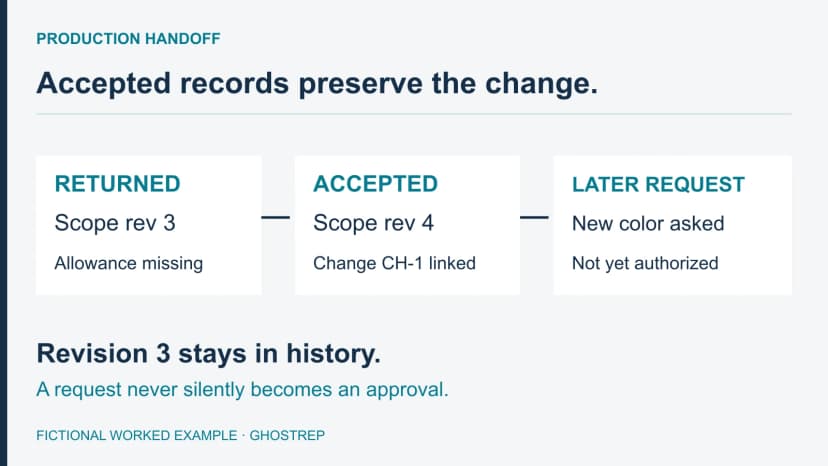
Job R-104 is a fictional retail replacement. These invented references demonstrate record structure, not a universal CRM schema or a real job. The company’s example rule requires a current agreement, confirmed selection, resolved scope exceptions and a recorded production reviewer before acceptance.
- Identity / boundary
- R-104; sold-job event E-11 (September 14, 2026, 09:12 Central) links the signed agreement AGR-104 revision 3. Sales coordinator owns submission until production review.
- Agreement / scope
- AGR-104 revision 3: verified source. Decking allowance clarification EX-4: missing information; estimator owns the answer. Review required before acceptance.
- Selection
- SEL-104 revision 1: homeowner-approved selection recorded and source linked. Production reviewer verifies this reference; a remembered color in notes cannot replace it.
- Access / commitment
- Homeowner requested an access-coordination call, per note N-8. Requested, not confirmed. Coordinator owns confirming access before scheduling under the separate production rule.
- Exception / handoff status
- Returned for missing information. Required item EX-4 has no reviewed controlling revision; record names estimator as current owner.
- Decision / history
- Reviewer PR-1 records return event E-12 (September 14, 2026, 10:05 Central) and the missing-allowance reason. The signed agreement remains visible; the return does not undo the sale.
The estimator later provides reviewed clarification EX-4 revision 1. If it changes the agreement, the required authorization must also be recorded; a new attachment alone cannot amend a contract. In this example, authorized scope revision 4 resolves the allowance and becomes the controlling reference.
- Resolved field
- Scope revision 4 linked; authorized change CH-1 recorded; EX-4 marked verified by the designated reviewer. Earlier revision 3 remains in history.
- Acceptance
- PR-1 accepts the handoff at event E-14 (September 15, 2026, 14:10 Central) after checking the required field states. Current record references scope 4 and selection 1.
- Later selection request
- Customer asks for another color after acceptance. Record request CR-2 (September 16, 2026, 09:00 Central); do not overwrite selection 1 or imply the request is authorized.
- Change review
- Authorized change CH-2 and selection revision 2 become effective at the recorded review event (September 16, 2026, 13:20 Central). Production owner reviews downstream effects before revising work instructions.
- What remains separate
- Acceptance does not by itself confirm access, permit status, payment, material availability or an installation date. Those controls stay with the responsible production and finance records.
Use the six-part field contract for each group: purpose, controlling source, current owner, allowed state, exception path and history event. “Not applicable” requires the company rule and reviewer; a blank cannot silently mean complete. The four-clock forecast consumes the recorded acceptance event while keeping signing, completion and collected cash separate.
Use Controlled States, Not Blanks
The blank handoff tool uses four evidence states because they preserve different operating conditions:
- Verified against company rule: an assigned human reviewed the approved evidence using the company's definition.
- Missing information: a required source or value is absent or incomplete.
- Not applicable under company rule: the company determined that the category does not apply at this boundary.
- Manager or specialist review required: evidence exists, but the question falls outside the current owner's authority or the company rule does not resolve it.
Missing information and specialist review cannot be merged into “problem.” If the approved scope revision is absent, the field is missing evidence. If the source exists but requires qualified interpretation, the field needs specialist review. Each state produces a different owner and next action.
Fictional insurance-restoration example: A scope history is linked, but the company-approved controlling revision is unclear. The record can route that defined question to a manager or specialist without deciding coverage, interpreting carrier obligations, or rewriting the source.
These states govern evidence handling. They do not determine whether a roof is damaged, a permit is required, insurance applies, a contract term is enforceable, a manufacturer requirement is satisfied, or a site is safe. Those decisions stay with the appropriate authorized source under company policy.
Do not calculate a readiness score from the states. Ten completed administrative fields do not compensate for one unresolved controlling source. The record supports an explicit human outcome; it does not automatically accept the job or predict delay, callback, complaint, margin, or employee performance.
Link the Source; Do Not Rewrite It in Notes
A handoff field should point to the evidence that controls. Rewriting the agreement, scope, inspection, selection, or approved change in a notes field creates a second version that can drift when the source changes.
Roofr's direct Job Card documentation describes one job record that can contain job details, tasks, measurements, proposals, material and work orders, attachments, and a detailed activity log. That is a concrete software example of connected record objects, not a required GhostRep schema. See Roofr's guide to managing Job Cards and their linked records.
For an inspection source, the handoff can store the approved reference, revision, evidence state, current owner, and last review event. It should not draft a second inspection narrative. The Roofing Inspection Summary Generator owns inspection-summary drafting. The same boundary applies to an approved change or supplement record: the Roofing Supplement Script owns supplement documentation language, while the handoff field identifies the controlling source.
If the source changes, update the reference and add a history event. Do not erase the prior reference or paste the new text over the old note. The receiving team needs to see that the controlling record changed and whether company policy requires renewed production review.
History Is an Event, Not an Updated Date
“Updated Tuesday” is not enough. It does not reveal whether sales supplied a missing source, production reviewed it, a specialist resolved an exception, or an authorized person replaced the controlling revision.
A useful history event identifies the acting role, the previous state, the new state, the source affected, and the date and time in the company's chosen time-zone convention. JobNimbus's Activity documentation gives a direct product example: activity entries can show a timestamp, the person involved, related records, and the change or communication. See its guide to record activity and change history.
Applied to the fictional selection field, the history should show that production returned a missing source, the designated sales role linked the approved record, the evidence state changed, and production reviewed it again. It should not erase the return or turn the activity history into an employee discipline file.
The company must define which events matter, who may create or correct them, and how long they are retained. This article does not prescribe an audit-retention rule, universal deadline, or permission model.
Map the Dictionary Into Existing CRM Objects
Start in a field dictionary, not a live customer record. For each group, write the purpose, approved source, accountable role, allowed state, exception path, acceptance authority, and history event. When the company has not defined a rule, mark it for management or qualified review instead of borrowing a generic requirement.
Then map each contract to the CRM's existing objects. A linked record may serve better than a text field. An option list may serve better than free-form status copy. An attachment reference may remain in its source module. An activity event may already capture the actor and timestamp. Avoid duplicate fields whose only purpose is to reproduce an existing source.
Test the mapping with clearly fictional records in an approved sandbox: one with verified evidence, one with a missing source, one with a company-defined not-applicable category, and one requiring specialist review. A second authorized person should be able to identify the current state, controlling source, and next owner without relying on a private message or oral explanation.
Fictional commercial example: A company-defined project submittal category has a source reference, but the receiving production role is not the approving authority. The field contract records the source, current state, and specialist owner; it does not copy the submittal package into notes or mark it complete because a file exists.
If the company needs a broader procedure for defining and maintaining those rules, the Contractor SOP Generator owns that larger artifact. If it is selecting a vendor, the roofing CRM comparison owns software-evaluation intent. GhostRep Job Intel can help approved teams carry existing job context into supported workflows, but it does not replace the production system's source records or acceptance authority.
What This Record Can Prove
A complete handoff record proves only that an authorized human applied the company's evidence and ownership rules, selected an allowed outcome, and recorded it at a particular time. It does not prove that every source document is technically correct, a downstream job will stay on schedule, a permit or claim has a particular status, or no later change will occur.
That narrower promise is useful. Production can see which source it reviewed, sales can see why a record was returned, a manager can see which category needs qualified review, and later changes remain visible. The CRM becomes a governed bridge between source records instead of a long note that tries to tell the entire project story.
Build the reusable company structure with the blank roofing sales-to-production handoff generator, using fictional categories rather than live job data. For the broader sales and operations context, see GhostRep for roofing sales teams.
About the Author
Tim Nussbeck
Founder & CEO of GhostRep
20+ years in roofing and home improvement sales—knocking doors, running teams, and building practical coaching systems. Built GhostRep to give every rep access to the coaching top teams get.
Manager next step
Turn this into a manager workflow your team can repeat
Use the management tools if you need a practical coaching or accountability system first. Book a walkthrough if you want GhostRep tied to rep performance and live coaching.
- ✓Best fit if coaching is inconsistent across reps and managers.
- ✓Useful for 1-on-1s, scorecards, and weekly operating rhythms.
- ✓Demo shows how AI Sales Coach turns performance data into specific guidance.
Start Here
Browse management tools
Open scorecards, coaching docs, forecast templates, and manager workflows.
Browse management toolsNeed it mapped to your team?
Talk through your current workflow, traffic mix, and where GhostRep fits before you change anything.
Book a 15-minute walkthroughYou Might Also Like
Move a signed roofing job from sales to production with clear ownership, evidence checks, missing-information returns, and a defined acceptance point.
Read article →Use a seven-gate roofing CRM rollout plan for workflow mapping, configuration, pilot testing, role training, go-live, and the first 30/60/90 days.
Read article →Build a clear intake-to-calendar handoff for roofing leads with ownership, urgency, follow-up status, and a defined stop once the appointment is booked.
Read article →