In this article
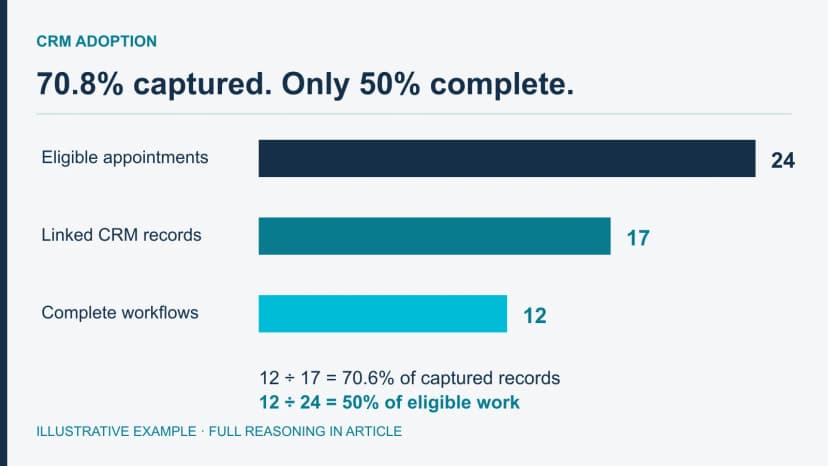
A roofing CRM adoption report should show whether actual appointments leave usable records. Start outside the CRM so missing entries stay in the denominator. In this example, 70.8% capture conceals a larger problem: only half the eligible workflows are complete.
Exception handling belongs to the process owner responsible for the broken step. Use the CRM rollout checklist to verify configuration and handoffs after the repair; use the metrics below to reconcile the actual work population.
Reconcile a dashboard to the work that actually happened
This fictional audit reconciles 24 deduplicated calendar events to 17 linked CRM records and 12 complete records. A CRM-only denominator would hide the seven missing entries. The IDs below are teaching examples.
- A01–A12: twelve events
- Each has one linked CRM record, the required appointment notes, one current owner and an explicit next action or completed disposition.
- A13–A15: three events
- CRM records exist, but required appointment notes are absent. Assigned owners and dated next actions are present.
- A16: one event
- CRM record exists; notes and current owner are absent. The record says “follow up,” with no accountable action.
- A17: one event
- CRM record exists; notes and next action are absent. Two conflicting owner fields make ownership unresolved.
- A18–A21: four events
- The calendar shows appointments but there is no linked CRM record. The calendar-to-CRM connection failed.
- A22–A24: three events
- No linked record. The office booked them outside the established intake path.
Reconciled totals: workflow coverage is 17 ÷ 24 = 70.8%. Completeness among captured records is 12 ÷ 17 = 70.6%. Complete workflow coverage across all eligible events is 12 ÷ 24 = 50%. The first two percentages sound healthier than the third because they answer different questions.
Exactly-one-owner coverage among captured records is 15 ÷ 17 = 88.2%; next-action coverage is also 15 ÷ 17 = 88.2%. If management wants coverage across all 24 events, those rates are 62.5%. Label the denominator on every display. Do not mark the seven missing records complete or infer their quality from the calendar.
Repair assignments: The integration owner investigates A18–A21 and restores the failed mapping. Office operations routes A22–A24 through intake. The sales manager reconciles A16 and A17 with the assignment history before naming an owner. Assigned reps add the missing notes for A13–A17 using the actual appointment evidence; they must not invent a conversation to satisfy a required field.
For missing note content, use the call-notes template. For a transfer to production, use the separate handoff-field guide. This audit identifies absent workflow evidence; it does not redefine either record.
Manager decision: Repair intake and the failed connection before assigning individual adoption blame. Rerun the same 24 IDs, retain the original counts and test new bookings through both paths. Backfilling old records does not show that the next appointment will arrive correctly.
Related guidance: roofing CRM comparison, roofing CRM rollout plan.
Define the Metric Contract Before Calculating a Rate
Two reviewers should obtain the same rate from the same rules and sources. Define these fields before building the chart:
- Eligible event
- The workflow occurrence expected to leave evidence, such as an accepted inbound inquiry, completed appointment, sent proposal, approved handoff, or company-defined task.
- Numerator
- The eligible events that meet the exact evidence state being measured.
- Denominator source
- The authoritative or reconciled count of all eligible events. A CRM-only denominator cannot reveal eligible work that never entered the CRM.
- Window and grace rule
- The event period, reporting cutoff, and any company-defined time allowed before review. Do not invent a universal same-day or 24-hour standard.
- Cohort
- The workflow, role, branch, pilot group, device path, integration, or version being examined. Keep the group large enough to avoid a disguised named-person score.
- Exclusions and evidence states
- Training records, approved duplicates, not-applicable cases, reopened items, integration failures, and other states the company defines. “Unknown,” “not applicable,” “exception,” and “missing” are not interchangeable.
- Permitted response
- The configuration, permission, integration, definition, training, capacity, or exception-path question the signal may trigger—and the role authorized to own that review.
Salesforce’s adoption guidance treats logins and updates as early usage signals alongside completeness and shadow systems. Login activity cannot establish a completed roofing workflow.
Roofing CRM Adoption Metric Dictionary
| Signal | Company-defined calculation | Denominator source | What it can reveal | What it cannot prove |
|---|---|---|---|---|
| Workflow coverage | Eligible events with an approved CRM record divided by all eligible events | Reconciled intake, calendar, estimating, or other approved event source | Whether work is bypassing the source of truth | That a captured record is complete, accurate, or well handled |
| Stage-gate completeness | Records meeting the required evidence state divided by records reaching that gate | CRM records reconciled to the company's stage-entry rule | Where required operating context is absent, stale, or unlinked | Technical, legal, insurance, accounting, code, or safety compliance |
| Ownership coverage | Open records with exactly one accountable current owner divided by open records requiring an owner | Approved open-record population | Unowned work, conflicting assignments, and queue-design gaps | Whether the assigned person is effective or should face an employment action |
| Next-action coverage | Unresolved records with an allowed action, owner, and review point divided by unresolved records | Approved unresolved-record population | Work that may disappear inside vague statuses | That the action is commercially or professionally correct |
| Task follow-through | Eligible tasks reaching an allowed completion, reschedule, return, cancellation, or escalation state divided by tasks due for review | Deduplicated task population under the current task rule | Broken reminders, unclear ownership, and impractical task rules | Effort, intent, conversation quality, or a universal timeliness standard |
| Exception traceability | Exceptions with a reason, owner, next action, and resolution state divided by recorded exceptions | Approved exception population | Whether edge cases remain visible and owned | That a qualified specialist resolved the exception correctly |
| Cross-role continuity | Eligible transfers with required linked evidence and receiving-role acknowledgment divided by eligible transfers | Approved source and destination event records | Where office, sales, or field context breaks between roles | Production readiness, customer satisfaction, or job success |
Set the event, required evidence, reporting window and allowed exceptions for your company. The Sales Pipeline Template defines stages and exit criteria; this dashboard checks whether those rules are recorded.
Diagnose Each Signal Before Assigning a Correction
Workflow coverage
Possible system causes: an integration outage, form-mapping error, duplicate suppression, unclear intake ownership, missing mobile access, or continued use of an old tool.
Evidence to inspect: sample events from the independent source, record-creation logs where available, duplicate rules, integration errors, and the current intake procedure.
Permitted response: assign the investigation to the integration, system, or process owner. A coverage gap is not proof that one person refused to use the CRM.
Stage-gate completeness
Possible system causes: the field is unavailable on mobile, the stage rule is unclear, a default value hides an unknown, an integration overwrites evidence, or the workflow asks for information before the role can obtain it.
Evidence to inspect: the current gate definition, actual field states, timestamps, source links, change history, and affected device path. Count explicit states rather than merely non-empty fields.
Permitted response: the process and system owners decide whether to clarify the rule, repair configuration, change the evidence state, or return the gate definition for review. The production handoff CRM fields guide separately owns the governed sold-job record categories.
Microsoft’s data-management guidance emphasizes accuracy, completeness, reliability and currency. Check field history and source links: a populated default can be less useful than an explicit unknown.
Ownership and next-action coverage
Possible system causes: assignment rules fail, departed or unavailable users retain records, two roles believe they own the same transition, or vague states such as “working” and “follow up” substitute for an operating instruction.
Evidence to inspect: assignment history, queue rules, role permissions, unresolved-record samples, and the current ownership policy.
Permitted response: return a routing defect to the system owner or an ownership dispute to the authorized process owner. Shared visibility is useful; shared accountability is not.
Task follow-through
Possible system causes: duplicate task creation, broken due-date automation, tasks generated after the reporting cutoff, unclear ownership, or a rule that cannot be completed on the field device.
Evidence to inspect: creation source, rule version, due-date history, reopen state, cancellation reason, and automation errors. Exclude training examples and system artifacts that were never meant to be actionable.
Permitted response: fix the task rule, ownership, training, permission, or integration condition. Completing a task does not prove that a customer conversation was effective. Observable conversation coaching belongs in the AI Sales Coach workflow.
Exception traceability
Possible system causes: an exception queue has no owner, the normal path has no return state, a permission change blocks resolution, or several unrelated issues share one vague category.
Evidence to inspect: exception category, creation source, owner history, age under the company rule, next action, resolution state, and relevant configuration changes.
Permitted response: repair the exception path or route the underlying judgment to the qualified manager or specialist. Traceability cannot certify that a technical, legal, insurance, accounting, or safety decision was correct.
Cross-role continuity
Possible system causes: source and destination records are not linked, evidence is visible only to the sending role, acknowledgment states are ambiguous, or a side conversation has replaced the approved handoff.
Evidence to inspect: both sides of the transfer, access rules, timestamps, linked evidence state, return reason, and acknowledgment history.
Permitted response: assign the broken transition to its process and system owners. For a sold-job transfer, the Roofing Sales-to-Production Handoff Checklist Generator owns the blank acceptance-and-return control sheet. Adoption reporting observes the approved transfer; it does not make the production decision.
Route a Signal to the Right Process Owner
- Calendar events exceed CRM outcomes: inspect reconciled events, integration errors, and record-creation history for an intake, access, mapping, or old-workflow problem. Assign the review to the integration, system, or intake-process owner.
- Fields appear populated while exceptions rise: inspect field history, evidence links, exception reasons, and the current gate definition for defaults or copied values that hide unknown states. Assign the review to the data steward and process owner.
- Tasks become broadly late after a rule change: inspect rule versions, creation times, due-date history, and duplicates for an automation or population problem. Assign the review to the system owner with process-owner review.
- One transfer type is repeatedly returned: inspect returned records, reason codes, access state, and training version for an unclear evidence rule, permission, or receiving-role instruction. Assign the review to the handoff process owner.
Assign a correction after inspecting the records and configuration. Preserve the before-and-after definitions. A workflow rate alone should not rank employees or trigger employment decisions.
Use Baselines, Cohorts, and Definition Versions
Build the first baseline only after confirming that the eligible population and denominator source are usable. Compare later windows against the same definition. If a required field, integration, workflow rule, duplicate policy, or eligible population changes, annotate the change rather than presenting the series as uninterrupted.
Group by branch, workflow version, device or integration when that separates causes. Intake owns capture and routing; sales owns appointment outcomes; production owns receiving acknowledgment. The dashboard should reflect those responsibilities.
For very small groups, inspect records rather than publish unstable percentages or disguised individual scores. The Sales Onboarding Plan addresses employee ramp; this audit diagnoses the shared CRM process.
Salesforce's official data-quality assessment guidance recommends examining missing business-critical fields through reports and dashboards. The roofing-specific discipline here is to tie completeness to one approved workflow gate and preserve the source, evidence state, and definition version behind the number.
Review the same population after each repair
First establish the eligible event source, then reconcile missing records, then test the repaired workflow on new eligible work. Keep the definition version and original exceptions so the apparent improvement can be explained.
Build the Smallest Useful Adoption Dashboard
Start with capture, completeness, next action and exceptions for one workflow. Add a handoff metric only when both the sending and receiving records are accessible. More charts will not fix an unlinked event source.
Every displayed signal should name its definition version, denominator source, window, cohort, exclusions, review owner, and permitted response. If no one knows what action a chart is allowed to trigger, the chart is decoration.
Keep revenue and close rate in a separate business-outcome report. Recovered records demonstrate better visibility, not added sales.
The useful standard is not “everyone logged in.” It is “for eligible work, the team can find what happened, which evidence exists, who owns what happens next, and where the process needs human review.”
About the Author
Tim Nussbeck
Founder & CEO of GhostRep
20+ years in roofing and home improvement sales—knocking doors, running teams, and building practical coaching systems. Built GhostRep to give every rep access to the coaching top teams get.
CRM stack next step
Separate the source of record from the sales-development layer
Use the CRM content to choose the operating system for leads and jobs. Use GhostRep when the visible pipeline still does not explain rep behavior, objections, follow-up quality, or coaching needs.
- ✓Best fit if you are deciding whether the issue is workflow or rep execution.
- ✓Useful for comparing CRM visibility against conversation-level coaching.
- ✓Demo shows how GhostRep sits around the CRM instead of replacing it.
Start Here
Compare CRM vs AI training
Read the side-by-side breakdown before treating every close-rate problem as a CRM problem.
Compare CRM vs AI trainingNeed it mapped to your team?
Talk through your current workflow, traffic mix, and where GhostRep fits before you change anything.
Book a 15-minute walkthroughYou Might Also Like
Separate the roofing job record from conversation capture, live support and manager coaching. See which system owns each fact and action.
Read article →Compare roofing CRM and AI training workflows with a complete fictional CRM-to-coaching record, evaluation checklist and pilot measures.
Read article →Compare JobNimbus, AccuLynx, ServiceTitan, Roofr, Leap, Jobber, Exterio, and HubSpot by workflow, pricing, integrations, and data exit.
Read article →