Official documentation fit
Build your roofing canvassing software shortlist
Name the job that is actually broken, then require the public evidence your team needs. The result ranks documentation fit—not field reliability, adoption, or a universal “best” vendor.
Your evidence-led shortlist
Workflow match = 6 points. Each selected requirement documented by the vendor = 2 points.
Shortlist position 1
Knockbase
Direct canvassing
Why it matched: Roofing-oriented territory execution, documented offline capture, HailTrace connectivity, and export claims.
Verify in the pilot: Price, minimum commitment, active HailTrace subscription, CRM field maps, export contents, and conflict recovery.
Shortlist position 2
SalesRabbit
Direct canvassing
Why it matched: Public plan information, a specific offline workflow, CSV export, and a documented JobNimbus connection.
Verify in the pilot: Implementation package, contract term, add-ons, offline photo recovery, and the exact JobNimbus field map.
Shortlist position 3
SPOTIO
Direct canvassing / field execution
Why it matched: Territory controls, a bounded offline workflow, exports, and documented roofing-system connections.
Verify in the pilot: Quote, commitment, 24-hour/500-record offline limits, and the exact direction and trigger of each integration.
Short answer: Start with SalesRabbit, SPOTIO, Knockio, D2D CRM, Knockbase, or RepCard if you need a true door-level canvassing platform. Add HailTrace to the shortlist when storm intelligence is central. Treat OptimoRoute, BatchLeads, and Map My Customers as adjacent tools with different jobs—not interchangeable roofing canvassing apps.
A roofing canvassing platform should preserve territory ownership, contact preferences and the next appointment handoff—even when reception is poor. This guide compares six direct platforms and four adjacent tools for routing, property data and storm intelligence. Start with the work your team needs to complete, then test the shortlisted product on a permitted field route before buying seats.
Use the interactive builder above to turn your operating constraint into a two- or three-product shortlist. Its points measure coverage in current official documentation, not product quality. The right choice is the finalist that preserves a clean chain from assigned street to worked door to qualified appointment to roofing CRM to sold job in your controlled pilot.
Roofing canvassing software should answer five operational questions: Which rep owns this street? Which doors were worked? What happened at each property? What is the next action? Did the qualified lead arrive in the company’s real system of record with the right owner and history?
That sounds basic, but software comparisons often blur three different layers. Street-intelligence tools identify where a crew may want to work. Territory-execution tools assign doors and capture field outcomes. Conversation tools help a rep improve what happens after a homeowner answers. Buying one layer does not automatically solve the other two.
This guide compares ten products using current official documentation, pricing pages, and help-center materials reviewed August 15, 2026. We did not complete a hands-on test of every platform, no vendor paid for inclusion, and the vendor links are not affiliate links. GhostRep sells sales-training and coaching software, not canvassing software, so we have a commercial interest in the conversation layer. That interest is why the page uses a published method, separates documented facts from demo questions, and gives you a test you can run without buying GhostRep.
If you need the words for the door rather than a territory system, use the roofing canvassing script generator. If you need to model whether the field program makes money, use the door-knocking ROI calculator. This page helps you choose the software.
Next Step
Turn canvassing software research into the field script
If the team is evaluating canvassing apps, the next step is tightening what reps say at the door and what happens after the homeowner answers.
The Roofing Canvassing App Shortlist
| Product | Correct category | Start here when | Published buying signal |
|---|---|---|---|
| SalesRabbit | Direct canvassing | You want public plan information, offline lead work, exports, and a documented JobNimbus path. | Lite is free for one user; paid Team and Pro pricing varies by billing term. |
| SPOTIO | Direct canvassing / field execution | You need territory controls, a bounded offline workflow, exports, and roofing-system integrations. | Custom quote; no self-service trial is published. |
| Knockio | Direct canvassing + field-service CRM | You want published per-user pricing and the option to connect canvassing with estimates, jobs, and payments. | Prospect starts at $25/user monthly for 1–4 users or $20 at 5+. |
| D2D CRM | Direct canvassing + CRM | You prefer flat team tiers over per-seat pricing and want setters, closers, territories, and pipeline together. | Published team plans start at $99/month; clarify separate “free” offers. |
| Knockbase | Direct canvassing | Roofing fit, offline capture, lead export, and HailTrace connectivity are important demo requirements. | Quote-based. |
| RepCard | Direct canvassing + field-sales operating system | You want canvassing alongside cards, follow-up, leaderboards, calendars, and training. | Team canvassing is listed in Pro at $49/user/month billed annually. |
| HailTrace | Storm intelligence + tiered canvassing | Storm maps and property targeting drive deployment, and Enterprise canvassing may be deep enough for your field process. | Quote-based; a limited free map tier exists. |
| OptimoRoute | Route-planning adjunct | You already have stops and records; route and schedule optimization is the actual bottleneck. | Lite is $35.10/driver/month billed annually. |
| BatchLeads | Property-data adjunct | You deliberately need real-estate property/owner data and driving-for-dollars workflows. | Growth is $119/month for up to three users. |
| Map My Customers | General field-sales platform | Your motion is account/visit based and native two-way enterprise CRM sync matters more than roofing-specific workflows. | Industry Leader is $99/user/month annually, five-user minimum. |
Do not read this as a universal ranking. The first six pass the direct-canvassing eligibility screen based on public documentation. The other four can still be right for a specific layer of the workflow. A storm-intelligence product should not lose points for lacking the same job as a door CRM, and a route optimizer should not be presented as if it stores roofing lead history.
How We Compared Roofing Canvassing Software
A product qualified as a direct canvassing platform only when current official material documented address-level door logging, territory creation and assignment, mobile lead or disposition capture, manager coverage visibility, and a workflow from the door to an appointment or CRM.
We then reviewed eight buying dimensions:
- Door and territory execution: Can a manager create, assign, reassign, and audit territory without losing ownership history?
- Offline and mobile behavior: What must be downloaded in advance, what can be captured without service, and how does resync behave?
- Roofing and storm fit: Does the published workflow address roofing records, storm deployment, estimates, or roofing-system integrations?
- CRM handoff: Is the connection native, API-based, file-based, or routed through an automation service? Is it one-way or two-way?
- Reporting: Can a manager connect doors, contacts, qualified appointments, inspections, and sold jobs?
- Data governance: Can the company export contacts, notes, photos, activity, ownership, and territories?
- Commercial clarity: Are price, minimum users, feature gates, onboarding, and trial terms public?
- Rep workflow: How many taps, screens, and corrections does a field outcome require in a controlled test?
The builder assigns six points when a product is in the correct workflow lane and two points for each selected requirement documented in current official material. That is an evidence-coverage score, not a performance score. We do not pre-score reliability, adoption, integration accuracy, or data recovery. Only the controlled pilot below can establish how well a finalist works in your roofing operation.
Six Direct Canvassing Platforms to Shortlist
SalesRabbit: Public Plans, Offline Work, and a Documented JobNimbus Path
SalesRabbit documents lead mapping, territories, rep locations, route planning, imports/exports, and analytics across its field-sales platform. Its current feature comparison lists a $0 Lite option for one user and shows paid Team and Pro plans with different monthly, quarterly, and annual rates. On monthly billing, the published chart lists Team at $59 per user and Pro at $75; the same chart lists Pro at $49 per user when billed annually. Add-ons such as DataGrid, Weather, and Digital Contracts should be priced separately.
For crews that cross weak-service areas, SalesRabbit’s offline documentation says reps can create and edit leads while offline, but DataGrid areas must be preloaded. The help article also gives a resync process rather than pretending offline work is automatic under every condition.
The JobNimbus documentation describes transferred fields and two-way behavior at the eligible tier, while the export guide documents CSV lead export. In a demo, use your fields and test changes in both systems. Do not assume that a marketplace logo proves the exact sync direction, duplicate policy, or plan gate you need.
SalesRabbit’s pricing FAQ says implementation packages are required and contracts run one to three years, while a separate small-team signup page promotes month-to-month terms. That conflict is a buying question, not something this comparison can resolve. Lite is also not a team trial: it is limited to one user, lacks team-management/web access, and its lead-retention rules differ from the paid platform.
Shortlist when: a documented JobNimbus workflow, public plan structure, offline lead work, and export are high-priority requirements. Verify: the implementation package, contract term, add-ons, territory reassignment, offline photo recovery, duplicate resolution, and the exact JobNimbus field map in writing.
SPOTIO: Field Execution for Teams That Need Integration Detail
SPOTIO positions itself as a field-sales execution layer with territories, location-verified activity, routes, reporting, pipeline visibility, and CRM connections. Its plans page uses custom-quote pricing and does not publish a self-service free trial, a minimum seat count, contract term, pilot rule, or implementation fee.
SPOTIO’s “Download My Day” feature supports a defined offline workflow: the selected area expires after 24 hours, a download is capped at 500 records, and offline routing, dashboards, new mobile-command-center activities, and automatic address resolution are unavailable. Its export documentation covers current and historical records. Its integration materials name roofing systems including AccuLynx and JobNimbus, but connection behavior is not universal. For example, SPOTIO’s AccuLynx support article describes a configured, stage-triggered one-way push from SPOTIO. That is different from continuous two-way record synchronization.
Shortlist when: a field team needs stronger territory governance, bounded offline access, exports, and a supported path into an existing CRM. Verify: seat minimum, commitment, implementation cost, pilot eligibility, the exact direction and trigger for each integration, photo recovery, record ownership, and the report that connects door activity to completed inspections.
Knockio: Transparent Canvassing Pricing With a Broader CRM Option
Knockio is no longer accurately described as only a route tool. Its current product and pricing page offers canvassing, a field-service CRM, or both. Prospect—the canvassing plan—is listed at $25 per user for one to four users or $20 per user at five or more. Organize covers field-service CRM functions, while Growth connects canvassing with CRM, jobs, estimates, invoices, and payments. The vendor states there is no setup fee and lists messaging as an optional add-on.
Published capabilities include territories, route planning, field lead capture, real-time tracking, contracts/e-signature, and integrations through Zapier and FlowChef. Its roofing material adds a roofing pipeline and estimating workflow. Those pages establish product scope, not implementation quality.
Shortlist when: a small or growing team wants to price a canvassing pilot without waiting for a custom quote, or wants canvassing and field-service records in one platform. Verify: offline behavior, full export rights, whether named CRM connections are native or automation-based, sync direction, webhook/API availability at the chosen tier, and whether the broader CRM matches the company’s production workflow.
D2D CRM: Flat Team Tiers With a Pricing Question to Resolve
D2D CRM documents territory assignment, door dispositions, routing, mobile apps, lead pipelines, setter/closer scheduling, dashboards, and integrations. Its main product page currently lists flat team plans: $99 per month for up to five users, $249 for up to 15, and $499 for up to 30. That can be easier to model than per-user pricing.
The same site advertises a 30-day, no-card trial while other official pages promote a “free forever” door-knocking product and a training offer that includes CRM access. Those messages make the exact boundary between trial, free product, paid software, and training bundle unclear. Treat “free” as a question to resolve in writing, not as the basis for a purchasing decision.
Shortlist when: flat team pricing and an integrated D2D pipeline appeal to a small or mid-sized crew. Verify: what remains free, which functions require a paid plan or training purchase, offline behavior, export contents, data retention after cancellation, support response, CRM integration direction, and how a departed rep’s records are reassigned.
Knockbase: Roofing-Oriented Canvassing With Offline and HailTrace Claims
Knockbase’s roofing product page documents territory tools, door logging, route planning, appointment capture, and a HailTrace connection. Its canvassing documentation describes offline capture for leads, notes, photos, and inspections, while its D2D product material describes lead export and CRM workflow connections.
Knockbase does not publish a list price and routes buyers to a demo. “No credit card required” describes the demo, not a documented free trial. The HailTrace connection requires an active HailTrace subscription. Knockbase also publishes performance claims on its own site; those are vendor marketing claims, not independent proof, so they are not used to rank the product here.
Shortlist when: roofing fit, offline capture, HailTrace connectivity, and export are core requirements. Verify: price and minimum commitment, the exact HailTrace workflow, CRM names and field maps, one-way versus two-way behavior, which photos and activity records export, territory reassignment, and what happens when offline edits conflict.
RepCard: Canvassing Inside a Broader Field-Sales System
RepCard should not be dismissed as a digital-business-card app. Its current canvassing product documents territory mapping, route planning, live rep/GPS tracking, door outcomes, reminders, assignments, and analytics. Its team pricing page lists Starter at $24 per user per month billed annually, Pro at $49, and Enterprise as custom. Canvassing and API access are listed in Pro.
The broader product combines canvassing with cards, follow-up, leaderboards, calendars, chat, and a training library. RepCard names JobNimbus, HubSpot, Salesforce, FieldRoutes, and Zapier connections, but does not publicly specify sync direction, fields, or tier for every connection. Its live-location support article requires Enterprise even though general canvassing appears in Pro. That breadth may reduce tool switching, or it may be more than a crew needs.
Shortlist when: the company wants a broader field-sales operating system rather than only door pins. Verify: offline behavior, JobNimbus field coverage and sync direction, complete export rights, Pro-versus-Enterprise GPS boundaries, API limits, data ownership, and whether reps can complete the required door record quickly on a phone.
Four Adjacent Tools That Should Not Be Forced Into the Same Ranking
HailTrace: Storm Intelligence That Also Offers Canvassing
HailTrace’s primary difference is storm intelligence, but the old claim that it is only a lead source is no longer accurate. Its plans page lists campaigns, custom pins, canvassing reports, an opportunities pipeline, lead lists, and canvassing features in Enterprise. The same page lists Maps & Data, Maps Only, and a limited free tier. Paid pricing is quote-based.
Its methodology material describes radar analysis, ground information, and human review. A storm map identifies an area for investigation; it does not prove damage at a specific property.
HailTrace names JobNimbus, SPOTIO, SalesRabbit, and OneClick Code integrations, but does not publicly disclose the fields, direction, triggers, or tier eligibility for each connection. It also does not publish paid prices, offline canvassing behavior, or self-service trial terms.
Use this lane when: storm intelligence drives territory selection. Verify: whether Enterprise canvassing is deep enough to be the field system, or whether it should feed a dedicated canvassing platform; also test field assignment, offline behavior, exports, property-data limits, and each integration’s direction.
OptimoRoute: Routing for Known Stops, Not a Door CRM
OptimoRoute is route and schedule optimization for delivery and field-service operations. Its pricing page lists Lite at $35.10 and Pro at $44.10 per driver per month when billed annually, plus a 30-day trial. Its driver-app guide documents offline work with later sync, completion/failed outcomes, notes, photos, signatures, and configurable forms. It also supports route history, live tracking, API connectivity, and route export.
That is useful when the company already has a defined stop list. Public documentation does not establish the address-level door dispositions, cold-territory ownership, or roofing lead history required to classify it as a complete canvassing CRM.
Use this lane when: route efficiency is the bottleneck and another system already owns the customer/lead record. Verify: file/API handoff, dispatcher workflow, driver licensing, mobile behavior, and how outcome data returns to the system of record.
BatchLeads: Real-Estate Property Data With Route Tracking
BatchLeads is primarily a real-estate investor and wholesaler platform. Its current pricing page lists Growth at $119 per month for up to three users, Professional at $349 for up to eight, and Scale at $749 for up to 26, plus a seven-day trial. Plans include defined lead and export quotas. Its mobile material documents physical and virtual driving-for-dollars routes, notes, photos, property data, and owner-contact workflows, but not a complete general offline-and-resync process.
No current official source reviewed for this update documents the hail-history capability or roofing-specific storm workflow previously attributed to BatchLeads. Its property and contact data may be useful in a deliberately designed research workflow, but it should not be presented as a roofing canvassing winner by default. Availability of contact data also should not be treated as permission for an outreach method; review applicable privacy and outreach requirements for the intended use.
Use this lane when: real-estate property intelligence is a defined input. Verify: data source/refresh, roofing relevance, export quotas, permitted use, CRM handoff, and whether the mobile route workflow captures the field outcomes the roofing team actually needs.
Map My Customers: General Field Execution With Native CRM Sync
Map My Customers is a general field-sales platform rather than a roofing-specific canvassing product. Its pricing page lists Industry Leader at $99 per user per month billed annually with a five-user minimum, Enterprise at $139 with a ten-user minimum, and Exec HQ at $199 with a 35-user minimum. The vendor documents routes, territories, activity capture, reporting, and configurable two-way connections with Salesforce, HubSpot, Microsoft Dynamics, Zoho, and NetSuite at applicable tiers. GhostRep keeps that field-execution layer separate from conversation practice and coaching.
Its FAQ documents offline accounts, activities, voice notes, and photos, along with CSV export and a 30-day export window after termination before production data deletion. The vendor says implementation generally takes two to four weeks and uses guided pilots rather than a self-service trial. The reviewed integration list did not document AccuLynx, JobNimbus, or HailTrace.
Use this lane when: the sales motion is account/visit based and native enterprise CRM sync matters more than roofing-specific storm workflows. Verify: door-level disposition speed, roofing-system handoff, required tier, implementation, offline conflict handling, and whether its account model fits high-volume residential canvassing.
The Three-Layer Roofing Field System
The cleanest buying decision starts by naming the layer that is broken.
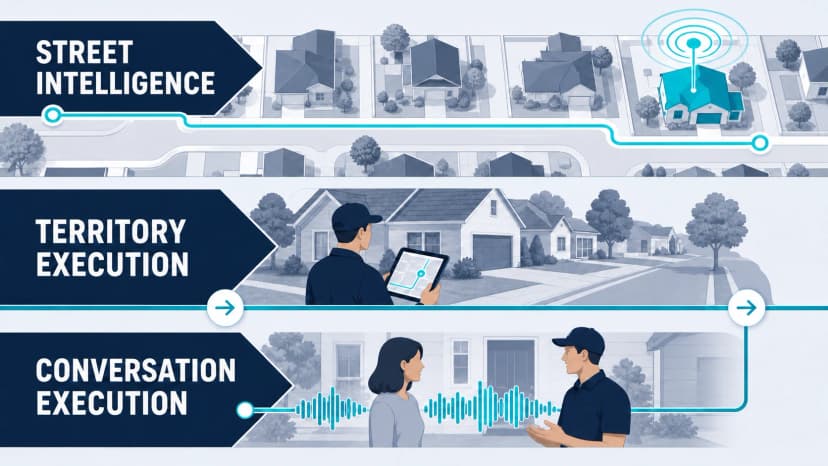
- Street intelligence asks where the team should work. Storm and property data belong here. Success is a documented territory rationale and an eligible property list—not a map that merely looks precise.
- Territory execution asks who owns each door, what happened, and what is next. A canvassing platform belongs here. Success is a complete, deduplicated field record that reaches the CRM with its owner and history intact.
- Conversation execution asks how well the rep handled the interaction. Training and coaching belong here. Success is observed behavior, a properly qualified appointment, and a reviewed outcome.
A canvassing app can reveal that a rep logged 40 doors and set no appointments. It cannot prove why. The failure could be the list, timing, route, opener, qualification, offer, or incomplete logging. Use territory data to locate the stage that needs investigation, then use observation and practice to diagnose the behavior. The door-knocking psychology guide owns the first-impression layer; this buyer guide does not.
Run the field handoff before buying more seats
A clean map demo does not show what happens when a rep loses signal, records a decline, or hands an appointment to the office. Use test records and verify the receiving system. The worksheet below records observations without assigning an invented vendor score.
Canvassing app field-pilot worksheet
Run these tests in a trial or test environment. Verified means you observed the result; it is not a vendor ranking. Selections stay in this page until you leave or reload. Download to retain the review.
0 of 5 reviewed
Territory ownership
Assign one sample territory to two test reps. Confirm the app shows ownership and prevents the duplicate work your team wants to avoid.
Poor-signal field work
Using a test record, follow the vendor’s supported offline workflow. Reconnect and check whether notes, outcome, and assigned owner persist correctly.
Permission and outcome
Record a request for no further contact and a separate requested appointment. Verify that the two outcomes remain distinct in the field view and downstream system.
Appointment handoff
Send a test appointment through the configured integration. Open the receiving system and verify date, time zone, owner, source, and access notes.
Supervisor review
Have a manager locate the unresolved test request and identify who owns the next action without asking the rep for a verbal recap.
For the conversation portion of the pilot, use the roofing canvassing script. Teams evaluating the same field software for another trade can test the pest-control doorstep rehearsal or follow an appointment into the window consultation agenda. Verify that the customer’s request and contact preference survive the handoff.
The 14-Day Roofing Canvassing Software Pilot
Do not run a vague free trial where everyone clicks around and votes on what feels best. Use one comparable territory, the real CRM, a small rep group, and pass/fail rules written before the test.
Pilot setup
- Choose one 200-home territory and document why it is appropriate for the test.
- Use two or three reps with different levels of field experience.
- Define allowed door outcomes, required fields, ownership rules, and next-action rules before importing anything.
- Connect a sandbox or controlled stage in the actual roofing CRM.
- Record the current process’s logging time, duplicate rate, correction work, and handoff failures as a baseline.
Ten tests every finalist must pass
- Create: Draw and assign the territory without vendor assistance.
- Reassign: Move half the territory after a simulated crew change while preserving history.
- Go offline: Work 20 controlled doors without service and verify complete, duplicate-free resync.
- Capture: Log outcome, note, photo, appointment, owner, source, and next action on a phone.
- Handoff: Send one qualified lead into the real roofing CRM with the correct fields and owner.
- Return: Change the CRM record and test whether the update returns when two-way behavior is promised.
- Deduplicate: Create a duplicate property/contact and document how the product resolves it.
- Offboard: Disable a departed rep and reassign every record, appointment, and territory.
- Exit: Export contacts, notes, photos, activity, ownership, and territory data in usable formats.
- Report: Produce a funnel from doors to conversations, qualified appointments, completed inspections, and sold jobs.
Use the roofing CRM rollout checklist to document owners and handoff tests, and the sales KPI scorecard to define the field evidence your managers will review.
Pilot scorecard
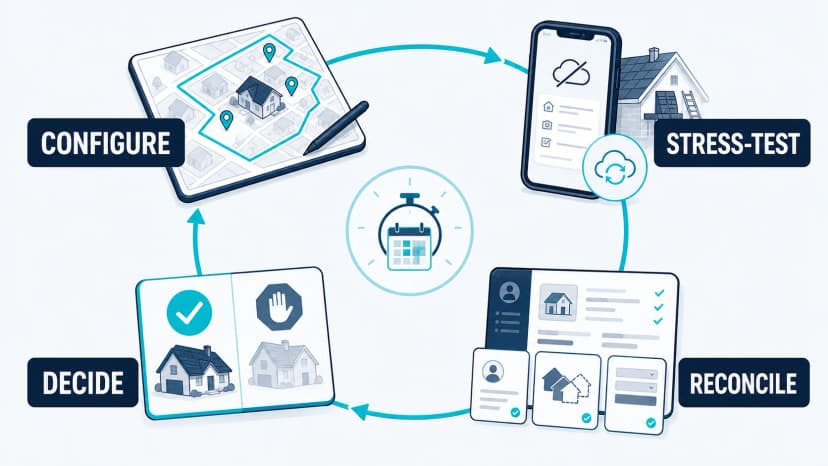
Write seven thresholds before the pilot starts:
- Required-record completion: worked properties with every required field ÷ worked properties reviewed. Set the minimum acceptable percentage.
- Duplicate rate: duplicate property or contact records ÷ unique records created. Set the maximum acceptable percentage.
- Sync integrity: records arriving with the correct owner and fields ÷ records sent. Set the minimum acceptable percentage.
- Offline recovery: define which offline events must recover completely, without duplicate records or missing media, and set the maximum recovery time.
- Rep logging time: use the median seconds required to complete the record across ten controlled attempts. Set the maximum acceptable median.
- Manager correction time: count minutes spent fixing ownership, duplicates, fields, and sync errors. Set the maximum per pilot week.
- Qualified handoff rate: appointments meeting the company's qualification rule ÷ appointments set. Freeze the quality rule before testing.
Set thresholds from your current process and business requirements, not a borrowed industry average. A product should not “win” because its team cherry-picked easier doors or changed the qualification rule mid-pilot.
Data, GPS, Privacy, and Exit Questions
Territory software affects employees or contractors, homeowner/property data, and the company’s future ability to leave a vendor. Put the rules in writing before rollout.
- GPS purpose: Define when location is collected, who can see it, how long it is retained, and how the policy is disclosed.
- Permissions: Separate rep, manager, administrator, and vendor-support access.
- Property and contact data: Document source, permitted use, refresh cycle, suppression process, and the rules that apply to each outreach channel.
- Media: Confirm where photos and recordings are stored, whether they export, and what is deleted at termination.
- System of record: Decide whether the canvassing app or roofing CRM owns contact status, appointment status, and follow-up.
- Exit: Require a sample export before signing. A promise that “your data is yours” is not enough if notes, photos, activity history, or territories cannot be retrieved in usable form.
The broader roofing CRM comparison helps choose the long-term system of record. Once that owner is clear, use the roofing CRM rollout plan to assign migration, field mapping, training, and QA responsibilities.
From Door Pin to Sold Job: Define the Handoff
Before configuring the app, write a small data contract for every qualified canvassing lead:
- property address or stable property ID;
- rep/owner and campaign or source;
- last attempt time and door disposition;
- contact details and documented communication preferences;
- qualification evidence and inspection/appointment time;
- notes or media required for the closer;
- next action, responsible owner, and due date.
Then decide which system is authoritative for each field. If both systems can change the same status without a conflict rule, the integration can create cleaner-looking dashboards while making the underlying record less trustworthy.
A weekly manager review should follow exceptions, not vanity door totals: unowned appointments, stale next actions, duplicate properties, failed syncs, offline records that never recovered, and leads that reached the CRM without qualification evidence. Those are the failures that break attribution and follow-up.
When Canvassing Software Is Not the Bottleneck
If territories overlap, records disappear, or managers cannot see what happened, fix layer two. If field records are clean but qualified conversations and appointments remain weak, investigate layer three. More precise pins do not teach a rep how to open, ask a useful question, respond to uncertainty, or earn a next step.
GhostRep works in that conversation and coaching layer. It does not replace territory mapping or door ownership. If your field system already produces trustworthy activity data but managers cannot provide enough observed practice and feedback, review GhostRep for roofing sales teams. If the immediate need is simpler, start with the free canvassing-script tool linked above.
Looking for a Roofing Sales App Rather Than a Canvassing App?
Many searches for a "roofing sales app" or a "roofing sales management app" are not about door ownership at all. They are about what happens after the knock: how the rep handles the appointment, how the manager hears it, and how the team practices the conversation. That is a coaching layer, and it sits beside the canvassing app and the CRM rather than replacing either.
GhostRep for roofing teams records authorized appointments, supports the rep with live cues when enabled, gives the manager the recording and a coaching action plan, and lets reps rehearse storm, retail, post-adjuster and rehash conversations with AI homeowner personas. It is sold as prepaid hours shared across the team, 25 hours for $200, with no subscription and no demo call. If your canvassing data is clean and the weak point is the conversation, start there instead of adding a seventh platform to this comparison.
Roofing Canvassing App FAQ
Which roofing canvassing app is best?
There is no defensible universal winner. SalesRabbit, SPOTIO, Knockio, D2D CRM, Knockbase, and RepCard all document the core functions of direct canvassing platforms, but their pricing, offline behavior, roofing integrations, export rights, and broader scope differ. Build a two- or three-product shortlist from your requirements, then run the same 14-day pilot.
Is there a free roofing canvassing app?
SalesRabbit documents a $0 Lite plan for one user. D2D CRM promotes a free product while also publishing paid team tiers and a training bundle, so confirm exactly which functions, users, support, and data rights remain free. A free tier is useful for learning the workflow, but it does not remove the need to test export, offline recovery, and CRM handoff.
Which canvassing apps work offline?
SalesRabbit, SPOTIO, Knockbase, and Map My Customers publish specific offline capabilities. The details differ: some data must be downloaded ahead of time, offline access may cover a defined period, and resync rules matter. Treat “offline mode” as a test case, not a checkbox—capture notes, photos, appointments, and edits without service, then verify recovery and duplicates.
Do canvassing apps integrate with JobNimbus or AccuLynx?
Some do, but an integration logo is incomplete evidence. SalesRabbit documents a JobNimbus workflow. SPOTIO documents roofing-system integrations, and its AccuLynx article describes a stage-triggered one-way push. For every finalist, verify eligible tier, fields, sync direction, trigger, owner mapping, duplicate handling, error reporting, and deletion behavior using your actual CRM.
Can HailTrace replace a separate canvassing app?
Possibly, depending on the tier and workflow. HailTrace now documents regions, pins, campaigns, canvassing reports, lead lists, and an opportunities pipeline in Enterprise. Test whether its field execution, offline behavior, integrations, reporting, and export meet your full layer-two requirements before adding or removing another platform.
How should a roofing contractor compare canvassing apps?
Use one territory, the same reps, the same required fields, and the same roofing CRM. Test reassignment, 20 offline doors, field capture, bidirectional behavior where promised, duplicate resolution, rep offboarding, complete export, and the funnel from door to sold job. Set pass/fail thresholds before the test.
Next Step
Connect canvassing activity to measurable sales output
The app should help managers see route work, appointment quality, and whether reps are improving from real door conversations.
Source and Pricing Note
Product features, plan gates, pricing, integrations, and data policies change. This comparison was rebuilt from official vendor pages and help documentation reviewed August 15, 2026. Prices shown are public list prices and may exclude annual commitments, add-ons, implementation, taxes, data, messaging, minimum users, or negotiated terms. Ask each finalist to confirm the proposed configuration in writing and attach the completed pilot scorecard to the purchasing decision.
Free tools for door-to-door reps
Give canvassers something they can use today
Pair the strategy in this article with free tools for scripts, door hangers, homeowner texts, and field follow-up.
Field sales tools
Generate homeowner texts, canvassing assets, inspection summaries, and follow-up language.
Browse field sales tools →Training tools
Build knock tracks, objection handlers, and practice scenarios before reps burn live doors.
Browse training tools →Echo
Support reps live in the field with in-ear coaching during real conversations.
See Echo →About the Author
Tim Nussbeck
Founder & CEO of GhostRep
20+ years in roofing and home improvement sales—knocking doors, running teams, and building practical coaching systems. Built GhostRep to give every rep access to the coaching top teams get.
Field next step
Give your reps something they can use before the next knock
Keep territory execution separate from conversation practice. Test the selected field workflow before buying seats.
- ✓Best fit if reps need sharper first knocks and second visits.
- ✓Useful for follow-up language, inspection texts, and canvassing flow.
- ✓Role Play rehearses the door before the route; Echo brings the real conversation back for review.
Start Here
Browse field sales tools
Create homeowner texts, canvassing assets, inspection summaries, and follow-up copy.
Browse field sales toolsAnother way in
Review shared prepaid hours, complete payment, then set up the workspace.
View prepaid pricingYou Might Also Like
Define observable roofing sales skills by selling stage. Compare two discovery attempts and see how managers calibrate evidence before assigning practice.
Read article →Compare D2D CRM and GhostRep using a two-rep funnel, published pricing and the difference between territory operations and conversation coaching.
Read article →Calculate roofing canvassing ROI from paid hours to collected jobs. Separate route productivity, appointment quality and the six-stage survival rate.
Read article →